





Google AI now has over 350 million users, and Gemini is the powerhouse at the center of it all.
With the release of its newest generation model—Gemini 3 Pro—Google AI has made major improvements in reasoning, coding, and factual accuracy, sparking a wave of interest from users looking to subscribe.
Before you decide to buy, it’s important to understand how Google AI’s pricing works and what separates each subscription tier. This will help you choose the plan that actually fits your needs.
In this guide, you’ll get a clear breakdown of the Gemini 3 Pro price, how each subscription level differs, and a few practical tips for getting Gemini 3 Pro at a lower cost.

What is Gemini 3 Pro?
Gemini 3 Pro is Google’s newest generation large language model (LLM) and the first model released in the Gemini 3 series. Its biggest highlight is its ability to “think” in a way that’s closer to human reasoning.
Unlike fast-response conversational models (such as the Flash series), Gemini 3 Pro runs internal reasoning before answering complex questions. It breaks problems into steps, checks its own logic, and refines the output instead of simply predicting text based on probability.
This design gives it a major boost in accuracy and stability when tackling challenging math problems, writing complex code, or performing deep logical analysis.
In Google’s current product lineup, you’ll need at least the Gemini Advanced subscription to fully access the capabilities of Gemini 3 Pro. The free version also lets you use the model, but with a strict daily limit.
If you want to learn more about Gemini 3 Pro, you can check out the Gemini 3 Overview.
Gemini 3 Pricing Overview (2026 Update)
Official Gemini 3 Subscription Plans (Free / Pro / Ultra)
Google offers three subscription tiers for Gemini 3, covering everything from basic use to advanced professional workloads. Below is the latest pricing for each plan:
Subscription Tier | Price | Supported Models |
Gemini Free | Free | Gemini 2.5 Flash / Gemini 3.0 Pro (limited use) |
Google AI Pro | $19.99/month | Gemini 3.0 Pro |
Google AI Ultra | $249.99/month | Gemini 3.0 Pro (higher compute power) |
Google’s pricing for Gemini 3 is generally aligned with other major AI tools on the market. The Free, Pro, and Ultra tiers give users a clear upgrade path, ensuring that everyone—from casual users to power users—can access the level of AI performance that matches their needs without unnecessary cost.
Gemini 3 vs. Other AI Tools: Pricing Comparison
When evaluating the overall value of Gemini 3, comparing its pricing with other major AI platforms is one of the most important reference points. The table below gives you a quick look at how the leading AI models are positioned at their entry-level subscription tiers:
Brand | Entry Plan Name | Price | Flagship Model (2026) |
ChatGPT | Plus | $20/month | GPT-5.1 |
Claude | Claude Pro | $20/month | Claude Sonnet 4.5 & Opus 4.1 |
Grok | SuperGrok | $30/month | Grok 4 |
Gemini | Google AI Pro / Advanced | $19.99/month | Gemini 3.0 Pro |
From a pricing standpoint, Grok’s SuperGrok is slightly more expensive at $30/month. The others—ChatGPT, Claude, and Gemini—sit in the same price bracket, with plans around $20/month.
However, Gemini stands out when it comes to discounts. Google AI Pro includes a free first-month trial, and the higher-tier Ultra plan currently offers a three-month promotion at $124.99/month, which is significantly cheaper than its regular price. Overall, Google’s promotional strategy is more user-friendly compared to other AI platforms.
For users who want to try Gemini for a short period or test a high-end model at a lower cost, now is an especially good time to get started.
🎉 If you’ve already used the official trial or want a long-term way to save on Gemini 💸, the GamsGo marketplace is a great option.
Verified sellers offer shared Gemini subscription seats 🔐 at prices far lower than the official plans. It’s a stable, safe, and budget-friendly solution for anyone who plans to use Gemini long-term ✨.
Gemini 3 Plans: What’s the Difference?
The higher your Google Gemini AI subscription tier, the more powerful your access to the Gemini 3 Pro model becomes. The free plan offers basic access to Gemini 3 Pro, but because of server load and daily limits, you can only run a small number of deep-thinking queries each day.
The Ultra plan gives you the highest level of access to Gemini 3 Pro, followed by the Pro subscription. Beyond model access, the three tiers also differ in areas like Deep Research, advanced image-generation limits, and how deeply Gemini integrates with Workspace tools.
Google AI Free
Best for: Light users who want to try Gemini’s core features rather than use it for heavy productivity tasks.
Gemini Free is essentially the “entry point” into the Gemini 3 ecosystem. The default model is Gemini 2.5 Flash, and you get about 5–10 uses of Gemini 3 Pro per day. It performs very well in speed, latency, and lightweight understanding tasks.
Here’s what you get with Gemini 3 Free:
- Basic multimodal capabilities: Supports text, voice, and image input. You can upload photos for OCR extraction, image analysis, and generate simple images powered by Imagen 3.
- Dynamic context window (32k–1M tokens): Suitable for everyday tasks like chatting, webpage summaries, and short document analysis.
- Lightweight code generation: Offers basic drafting, debugging suggestions, and syntax explanations for 20+ programming languages, but it’s not designed for large projects.
- Shallow integration with Google Workspace: You can access Gmail, Docs, and Drive through extensions, but you won’t get the deep, real-time collaborative document generation offered in the Pro/Ultra tiers.
Gemini Free is a good starting point, but if you want to experience Deep Think, advanced multimodal reasoning, or the full capabilities of the Gemini 3 generation, you’ll need to upgrade to Pro or Ultra.
Google AI Pro (Advanced): $19.99/month
Best for: Professionals who need high-accuracy reasoning, large-scale content processing, and deep collaboration within Google Workspace.
Google AI Pro is the key tier that unlocks the full power of Gemini 3. Compared with the free version, this plan gives you complete access to Gemini 3’s core abilities—including Deep Think, advanced multimodal reasoning, long-form processing, and full Workspace integration.
Here’s what you get with Pro:
Flagship reasoning capabilities: Exclusive access to Deep Think, which uses multi-step planning to dramatically improve performance on complex logic and decision-making tasks.
Exceptional context window: A stable 1M-token context capacity, allowing you to analyze a 1.5-hour video in one go or process hundreds of thousands of lines of code.
Deep Workspace integration: Fully embedded AI assistance in Docs, Gmail, and Sheets, enabling you to draft emails, summarize documents, and generate content directly inside the apps.
Coding & research power: Full code-refactoring abilities, plus the ability to use NotebookLM to analyze 20–30 documents at once.
If your workflow involves large-scale data analysis, intensive reasoning tasks, or relies heavily on Google Workspace, the Pro plan delivers a major boost in accuracy and productivity.
Google AI Ultra: $249.99/month
Best for: Top creative teams, large-scale developers, and enterprise users who need cutting-edge AI creation tools and the ability to process massive amounts of data.
Google AI Ultra is the highest tier in the Gemini 3 ecosystem. It includes everything in the Pro plan, while unlocking the maximum compute power, strongest reasoning performance, and exclusive multimodal creation tools available to the Gemini 3 Pro model.
In addition to everything offered in Pro, Ultra provides:
Top-tier compute and priority access: You get the highest compute priority for Gemini 3.0 Pro—ideal for users who frequently run large, complex Deep Think tasks.
Exclusive video generation: Ultra users get access to Veo 3.1, which can generate professional-grade AI videos up to 60 seconds long in full 1080p.
Professional creative tools: Includes access to Flow (AI video workflow), Whisk (advanced image processing), and other premium creation suites.
Ecosystem resources: Comes with 30TB of Google Drive storage, supporting large-scale data storage and analysis.
The core value of Google AI Ultra lies in its unlimited compute priority and access to industry-leading AIGC tools. It combines powerful 1M-token reasoning with state-of-the-art creation capabilities like Veo 3.1, all supported by massive cloud storage.
This tier is designed for teams that treat AI as a primary productivity engine and want a complete, high-end workstation for pushing the limits of creativity and large-scale data processes.
Is Gemini Advanced Worth It?
Based on everything above, the launch of Gemini 3 Pro is very likely to mark the next major shift in the AI landscape. For developers, designers, data analysts, and content creators, it’s essentially a full productivity upgrade.
If your work involves frequent long-form processing, code refactoring, complex reasoning tasks, or if you rely heavily on Google Workspace for documents, email, and collaboration, the productivity boost from Gemini Pro or Ultra can be game-changing.
Where can you get Gemini Advanced at the lowest price?
If you subscribe to Gemini Advanced or Ultra through the official channels, the long-term cost can be quite high. That’s why many users are now looking for more flexible and affordable ways to access the full capabilities of Gemini.
As a global marketplace focused on digital subscriptions and tool accounts, GamsGo allows you to experience the complete Gemini feature set at a much lower cost.
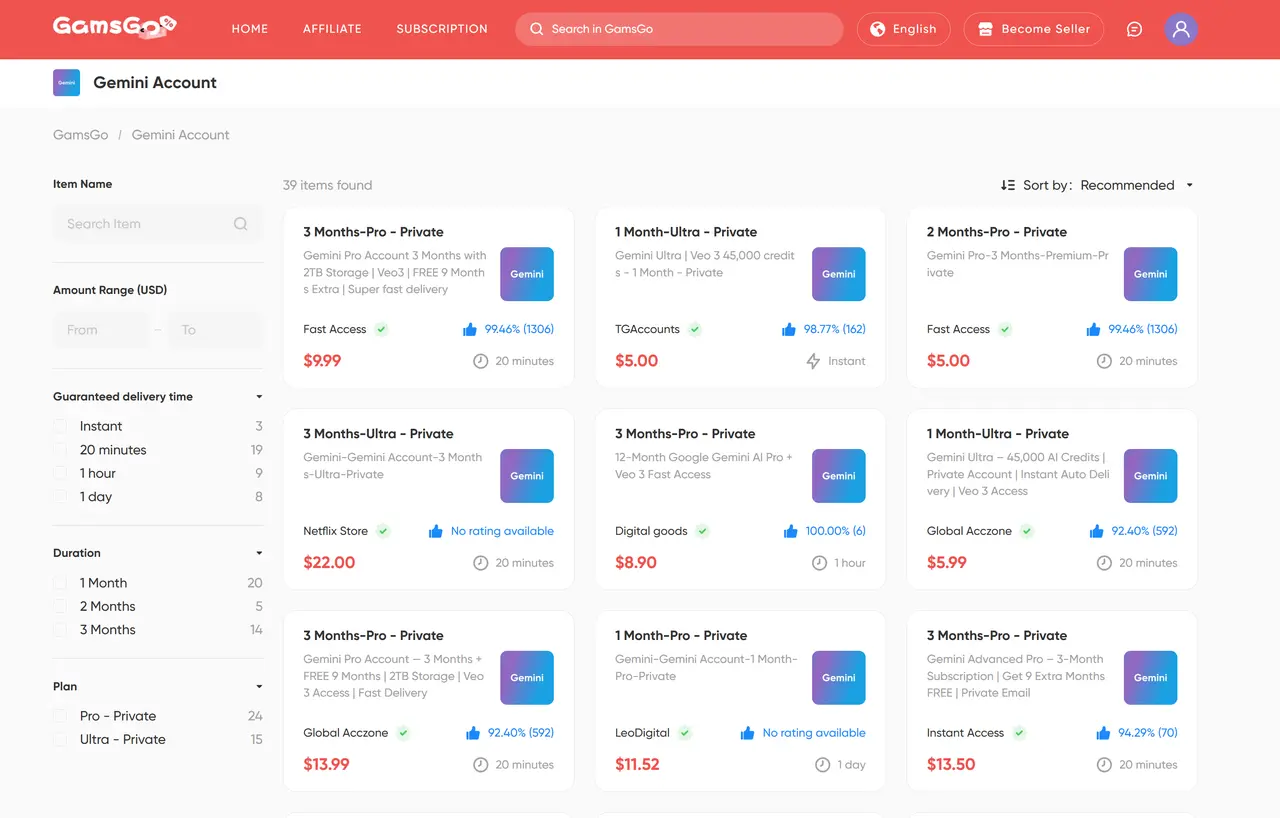
On GamsGo, Gemini subscriptions typically cost around $5 to $14, with slight variations depending on the seller and timing. Compared to the official price, this usually means a 60%–75% discount, sometimes even more.
Most listings also offer:
⚡ Delivery within 20 minutes
🛡 Verified, high-rated sellers (many with 99%+ positive reviews)
💳 Support for Visa, Mastercard, Amex, and other international payments
If you’re considering Gemini Pro or Ultra but don’t want to take on the full subscription cost, trying it through GamsGo is a smarter and much more affordable alternative.
Want to learn more tips for saving on AI tool subscriptions? Check out the articles below: 《How to Get Free ChatGPT Plus in 2026》,《ChatGPT Plus Review 2026
》
Conclusion
In terms of capability, Gemini Advanced is absolutely worth it. Its reasoning depth, long-form processing power, multimodal understanding, and deep Workspace integration make it far more powerful than the free version—especially for users who rely on high-efficiency productivity.
If you're concerned about subscription costs, the GamsGo Marketplace is the best way to save. You can usually unlock the full features for just 25%–40% of the official price, cutting your AI expenses while boosting your workflow efficiency.
Want to try Gemini Advanced for even less? Copy the code below to enjoy an extra discount—a special bonus just for blog readers! 👇
We’ve prepared an exclusive promo code for all blog readers:
Enjoy an additional 3% off on your next purchase!
Valid across all categories — streaming accounts, AI tools, game top-ups, software subscriptions, and more.
FAQ
Is Gemini cheaper than OpenAI?
Yes — in most cases, Gemini is cheaper than OpenAI’s models. Google’s Advanced plan typically costs less than OpenAI’s GPT-4-level subscriptions, while offering similar or even larger context windows. For users on a budget, Gemini usually provides a more cost-effective option.
Is there a charge for the Gemini app?
The Gemini app itself is free to use. You can access basic features without paying, but advanced tools like Gemini Advanced or Ultra require a paid subscription. So the app is free—only the upgraded AI capabilities come with a cost.
Which AI is better than Gemini?
There isn’t a clear “better AI” universally — it depends a lot on your use case. For example, Claude 3 (from Anthropic) is often praised for creative writing and safer outputs, and GPT‑4 (from OpenAI) leads in breadth of training data and ecosystem integrations.

