





In recent years, AI image generation tools have evolved rapidly. From Midjourney and DALL·E to Stable Diffusion, new platforms keep emerging, making the market more competitive than ever.
In this crowded landscape, Nano Banana stands out with its excellent text rendering and consistently stable editing results. According to Google Trends, its search volume has surged by 110% in a short period, making it one of the fastest-growing AI tools in the global creator community.
So what exactly makes Nano Banana special? And is it really worth your time to learn? Based on real-world usage, this article takes a deep dive into Nano Banana’s core features and actual performance to help you decide whether it’s the right tool for your creative needs.
Quick Takeaway
Since this article is quite long, I’ve placed the conclusion at the beginning. Based on real-world testing, Nano Banana is a highly worthwhile AI image generation tool.
It delivers high-quality images, fast performance, and an easy-to-use workflow. Because it’s integrated into Gemini, a single subscription gives you access to both Pro-level reasoning and top-tier image generation.
Compared to Midjourney, Nano Banana is easier to use. Compared to ChatGPT, it offers better image quality. Overall, it stands out as a cost-effective AI image generation tools in today’s market.

What Is Nano Banana AI?
Nano Banana (officially known as Gemini 2.5 Flash Image) is an AI image generation and editing model developed by Google DeepMind, first released on August 26, 2025.
It isn’t a standalone app. Instead, Nano Banana is built into platforms like the Gemini app, Google AI Studio, and Vertex AI as an image capability module. On November 20, 2025, Google launched an upgraded version called Nano Banana Pro (Gemini 3 Pro Image), bringing major improvements in image quality, generation stability, and editing performance.
In terms of features, Nano Banana lets you generate and edit images using natural language prompts. You can create brand-new visuals from text descriptions, or make precise adjustments to specific parts of an existing image while keeping the original intact.
If you want more frequent and flexible access to Nano Banana, Rita AI offers a one-stop solution powered by the official API, allowing you to use its full image capabilities at a lower cost.
Core Features: Why Nonabanana Stands Out
By 2025, generating images from natural language has become a standard capability across most AI image tools. However, many platforms still struggle with things like multi-step edits and precise text rendering. So how does Nano Banana perform in these areas? Below are insights based on real user testing and hands-on experience.
Character Consistency: Master Visual Storytelling
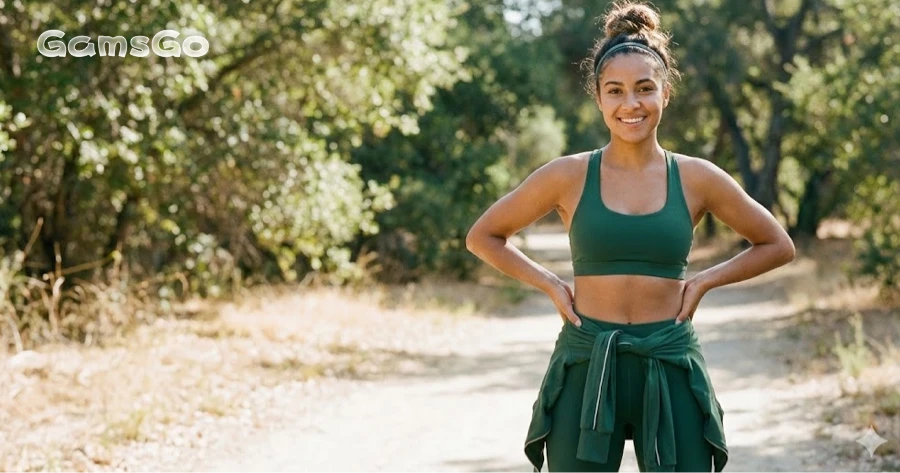
To test Nano Banana’s character consistency, I first generated a basic character profile. Then, without redefining her appearance, I used a series of follow-up text prompts to place her in different scenes.
Prompt: Generate a portrait of a young woman with a wheatish complexion, a healthy and well-proportioned figure, wearing sportswear.
The goal of this step was to establish a clear visual baseline for the character—covering her skin tone, body type, overall vibe, and style—so future generations could stay consistent.
Scene 1: Indoor Yoga (Same Outfit, Different Action)
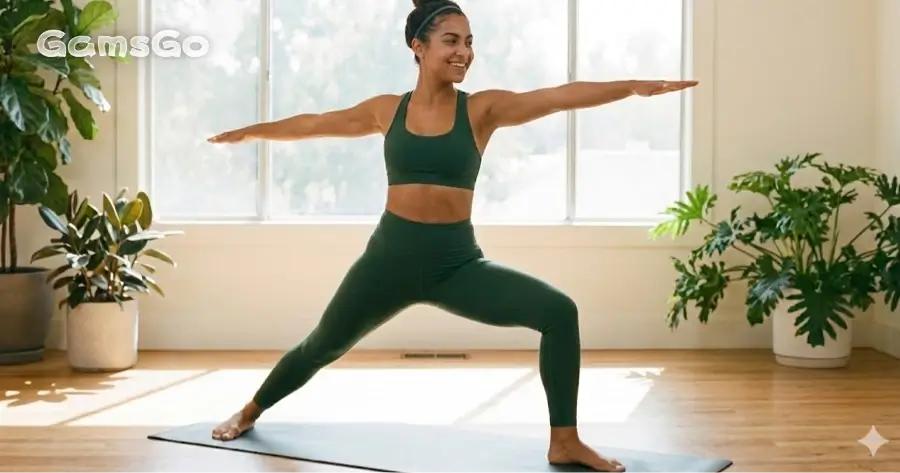
Prompt: The woman was still wearing that outfit while doing yoga indoors.
With this prompt, Nano Banana preserved the woman’s facial features, hairstyle, and body proportions, while only changing her pose and the environment. Her overall appearance and vibe remained consistent, and the yoga posture looked natural, with no obvious visual or logical issues.
Scene 2: Working in a Coffee Shop (New Setting + New Outfit)
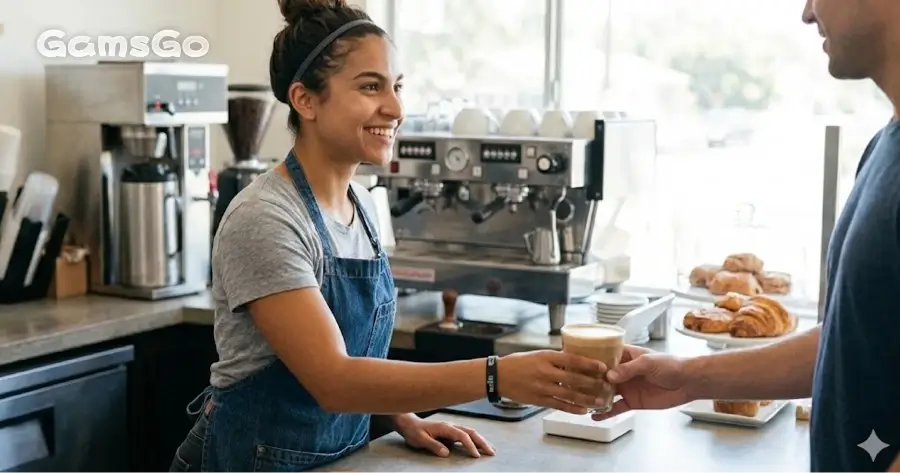
Prompt: The woman was working in a coffee shop dressed casually.
This step introduced both a change of environment and a change of clothing. Even so, the woman’s facial structure and overall appearance remained consistent. Despite the different outfit style, she was still clearly recognizable as the same person.
Scene 3: Teaching at a University (Role Change)
Prompt: The woman was teaching a class at a university.
This was the most demanding test for character consistency, as it involved not only a more formal setting and outfit, but also a shift in the woman’s implied professional role. Even so, Nano Banana maintained strong consistency in her facial features, hairstyle, and overall presence, allowing the character to feel continuous across different identities.
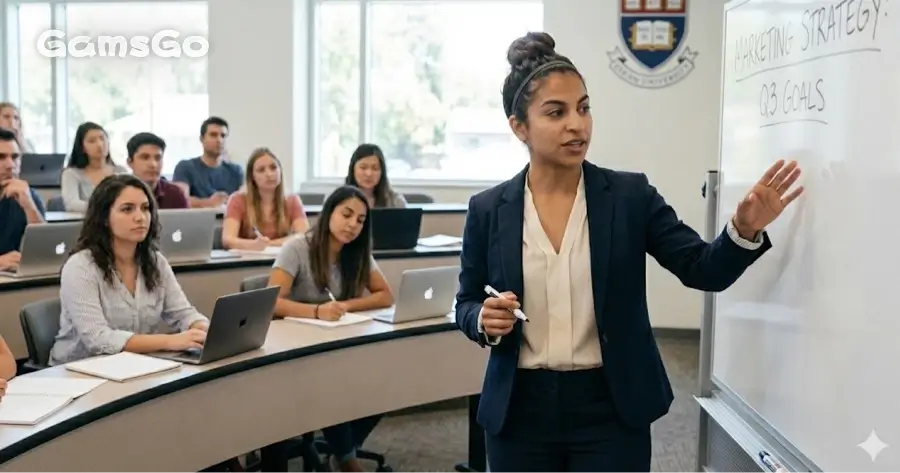
Overall, Nano Banana makes it easy to recognize the same character across multiple generations. Even when the setting, outfit, and role change, the woman’s facial features and overall look remain consistent.
Of course, the images aren’t identical—her expressions and poses vary from scene to scene. But these changes feel natural, rather than making the character look like a completely different person.
Image Fusion: Seamlessly Blend Your Concepts
In this example, I first generated a base character image—a full-body portrait of a woman with a natural standing pose and a clean background. This image was only meant to establish her silhouette, body proportions, and overall presence, without adding any specific scene details.
Next, I provided a winter street scene image and instructed Nano Banana to naturally place the character into that environment. Instead of manually adjusting her size, lighting, or colors, I let the model handle the full visual integration automatically.
Character generation prompt: Generate a full-body portrait of a tall woman with a middle parting, against a white background.
Image fusion prompt: Integrate the character naturally into the scene, ensuring realistic body proportions and correct perspective. Adjust the character’s clothing to suit the setting, and match the lighting and color tones to the surrounding environment.
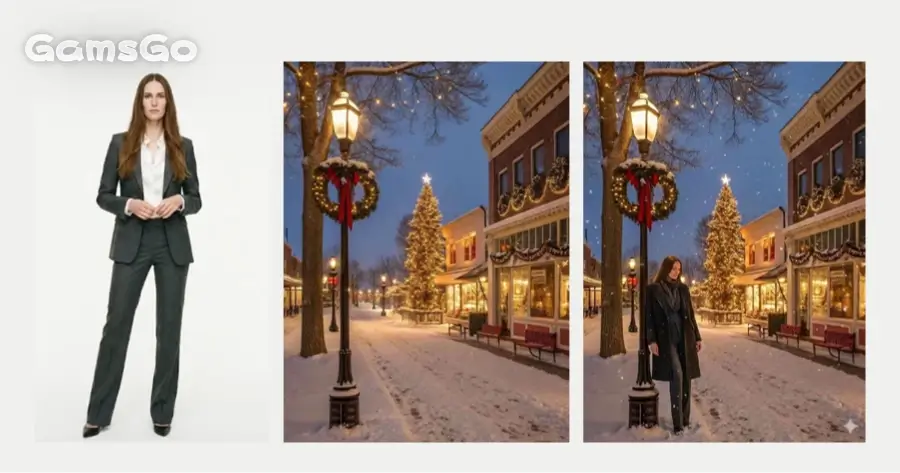
Looking at the final result, the character blends into the environment in a very natural way on multiple levels:
Proper scale and perspective: The woman’s height, position, and viewing angle fit the street scene realistically, with no floating or awkward proportions.
Outfit matches the setting: Her clothing was adjusted from a work outfit to something more suitable for a winter outdoor environment, staying consistent with the season and overall atmosphere.
Unified lighting and color tone: The brightness, shadows, and color temperature of the character match the nighttime street lighting, avoiding the “cut-and-paste” look or visual mismatch.
Overall, the image feels much closer to a real, professionally shot scene photo rather than a simple character-and-background composite.
Nano Banana image editing: Precise Control Over Your AI Art
Nano Banana offers a more intuitive way to edit images in Gemini. Instead of repeatedly writing complex text prompts, you can directly draw or mark on the image to show the AI exactly where to make changes and what to change.
After entering edit mode, you can use the brush tool to select the area you want to modify and add short text instructions to clarify your editing intent. The system mainly adjusts the marked area while keeping the unselected parts as unchanged as possible.
Case 1: Adding a Santa Hat (Local Edit + Character Consistency)
This example focuses on testing whether Nano Banana can add new elements directly to the main subject while still preserving the character’s original identity and visual features.
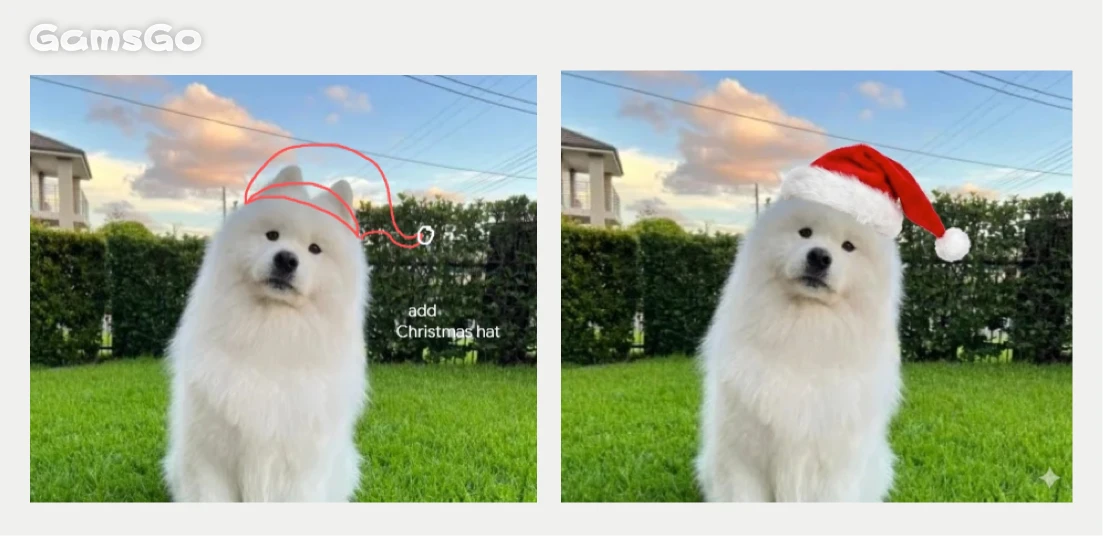
In the original image, I simply marked the top of the dog’s head with a quick drawing and added the instruction “add Christmas hat.” The results were quite stable in several key areas:
Precise control of the edit area: The Santa hat only appeared in the marked region, without affecting the dog’s face, fur details, or body proportions.
Subject consistency preserved: The dog’s expression, posture, and overall style remained almost the same before and after the edit, with no noticeable distortion.
Natural style and lighting integration: The added hat matched the original image in terms of color, lighting direction, and sharpness, avoiding a “pasted-on” look.
This shows that Nano Banana can handle local element additions effectively, enhancing images in a natural way while keeping the main subject consistent.
Case 2: Adding a Clock to the Background (Environment Edit + Structural Accuracy)
Unlike the previous example, this case doesn’t modify the main subject. Instead, it tests whether Nano Banana can add new elements to the background in a way that fits the existing scene structure—without interfering with the subject itself.
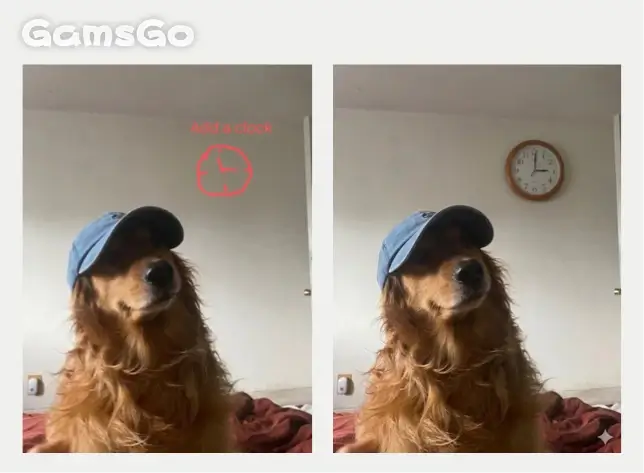
I marked the wall area and added the instruction “Add a clock.” In the generated result, several key points stood out:
Reasonable spatial placement: The clock was positioned appropriately on the wall, with no floating, awkward scaling, or obvious obstruction of the main subject.
Minimal disruption to the original composition: The dog remained the visual focus, and the new element didn’t disturb the overall balance of the scene.
Consistent editing logic: Nano Banana avoided unnecessary changes to unselected areas, keeping the overall structure of the image stable.
This case highlights Nano Banana’s performance in background-level editing. It not only recognizes the selected area, but also shows an understanding of scene structure, allowing it to add new elements in a visually coherent way.
Text Rendering: Generate Typographically Correct Images
In AI image generation, text has always been one of the most challenging elements. Misspelled long words, distorted characters, or text that feels disconnected from the image often make the results hard to use in real projects.
In this example, I tested Nano Banana using a movie poster with multiple layers of text. The image included a large title, a full-sentence tagline, and several lines of cast and crew information—putting both spelling accuracy and layout stability to the test.
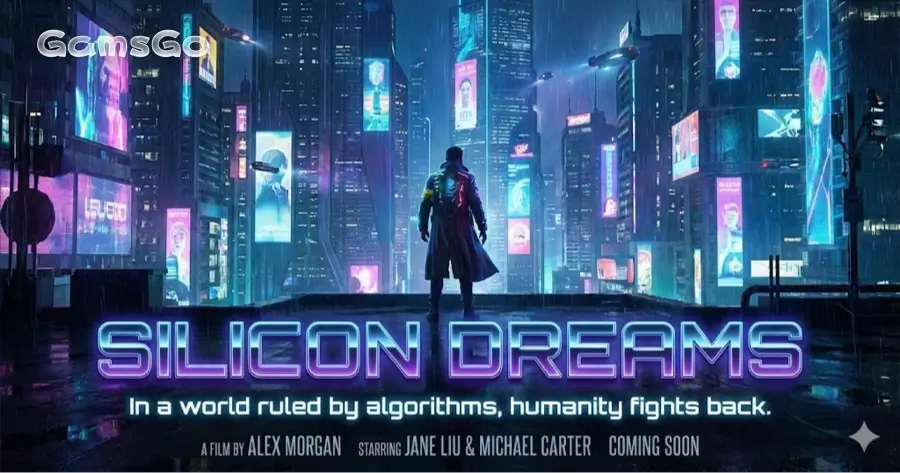
From the results, all the text in the image was spelled correctly, including long taglines and proper nouns. The different text layers were clearly distinguished by size, placement, and visual hierarchy, following the layout logic of a real movie poster.
The typography also matched the overall style of the image in terms of font design, perspective, and lighting, with no obvious “pasted-on” look or the common AI text distortion issues.
For users who need to create posters, banners, or other visuals with clear, readable information, this is a highly practical and noticeable advantage.
How to Use Nano Banana?
Nano Banana isn’t a standalone tool. It works as an image feature inside Google Gemini, so you can access it through Google’s official platforms.
The process is very simple:
Visit the official site: Open your browser and go to the Gemini website.
Open the toolbox: Click the “Tools” or “+” button next to the chat input box.
Select Banana mode: In the menu, find and click “Create images” (look for the banana icon 🍌).
Enter your prompt: Type the image description you want and send it to generate your image.
Ideal Use Cases: Who Should Use Nonabanana?
Nano Banana is better suited for users who value control and consistency in their creative workflow, rather than those who only want random, experimental outputs. In particular, it works well for the following groups:
Content creators and design-focused users
If you often need to make multiple revisions to the same image or character, Nano Banana’s stable performance across repeated edits can significantly reduce the need for regenerating from scratch and trial-and-error.Marketers, e-commerce sellers, and social media managers
For visuals that need to be used directly in campaigns, accuracy in text, consistent style, and reliable image quality matter more than a one-time “wow” effect—and this is where Nano Banana really shines.Projects that require character or object consistency
Whether it’s brand mascots, virtual characters, or content IPs, Nano Banana is especially useful when the same person or object needs to appear across different scenes while staying visually consistent.Users already in the Gemini ecosystem
If you’re already using Gemini, Nano Banana fits seamlessly into your existing workflow with almost no additional learning curve.
Overall, Nano Banana is ideal for users who prioritize usability and stability over purely random creative exploration. If your work involves repeated edits, precise control, or delivering ready-to-use visuals, its advantages will be even more noticeable.
Pricing & Plans: Is It Worth the Cost?
Nano Banana isn’t sold as a standalone image generation tool. Instead, it’s part of Google Gemini’s image capabilities, which means your access to Nano Banana depends on the Gemini subscription plan you choose.
Based on Gemini’s official pricing, there are three main tiers:
Gemini Free (Free):
Offers basic image generation using Gemini 2.5 Flash, with limited access to some Gemini 3.0 Pro features. This plan is suitable for light testing and casual use, but comes with clear limits on usage volume and performance.Google AI Pro ($19.99/month):
Unlocks the full Gemini 3.0 Pro experience, delivering more stable image generation and editing. This tier is better suited for individual users who regularly use Nano Banana for creative work, editing, or content production.Google AI Ultra ($24.99/month):
Provides higher computing resources and usage limits on top of Gemini 3.0 Pro. It’s designed for heavy users or scenarios that demand faster generation and greater stability.
💡 Tip: If you want access to Gemini’s advanced features at a lower cost, you can also look into third-party subscription platforms. For example, buying the Gemini Advanced plan on GamsGo can save you around 50% compared to the official price.
Budget Hacks: 5 Ways to Access Nonabanana for Less
If you want to lower the overall cost of using Nano Banana, the following options are some of the most practical and commonly used:
Use all-in-one platforms with official API access (e.g., Rita AI)
Some third-party platforms integrate Nano Banana’s official API into a unified interface. Compared to using Google’s native tools directly, these platforms often offer more flexible pricing models, making them ideal for users who generate images frequently or want to manage multiple AI tools in one place.Buy Gemini Advanced via third-party subscription platforms (e.g., GamsGo)
Certain account-sharing platforms provide Gemini Advanced / Pro plans at lower prices than the official subscription. For long-term Nano Banana users, this is one of the most straightforward ways to reduce costs.Start with Gemini Free for basic testing
Before committing to a paid plan, you can use Google Gemini’s free tier to test prompts, explore editing workflows, and evaluate whether Nano Banana fits your needs—helping you avoid upgrading too early.Work more efficiently to reduce regeneration
Try to define your goals and instructions clearly before generating images, so you can complete key edits in fewer attempts instead of relying on trial and error. This is especially important for higher-tier plans, where efficient usage can significantly lower the cost per result.Choose a plan based on your actual usage frequency
If you only generate images occasionally, a free or lower-tier plan is usually enough. Pro or higher plans are mainly worth it for high-volume creation, complex editing, or commercial use. Avoid paying long-term for computing power you don’t really need—this is one of the simplest yet most overlooked ways to save money.
Conclusion
After several days of hands-on testing, Nano Banana truly lives up to its reputation. It delivers high-quality images, fast generation speeds, and an easy-to-use workflow. Most importantly, because it’s integrated into the Gemini ecosystem, a single subscription gives you access to both Gemini Pro’s powerful reasoning and Nano Banana’s top-tier image generation—making it extremely cost-effective.
In comparison, Midjourney has a steeper learning curve with prompt writing, while ChatGPT’s image quality still falls a bit short. Nano Banana strikes the best balance between usability and visual quality.
If you plan to use it long term, you can save money by subscribing to Gemini Advanced through third-party platforms like GamsGo. Overall, Nano Banana is one of the best AI image generation tools you can choose right now.
FAQ
Can I use Nano Banana images commercially?
Yes, Nano Banana images can generally be used commercially as long as you comply with Google Gemini’s usage and content policies. Commercial use is allowed for outputs you generate, but you are responsible for rights, compliance, and ensuring the content doesn’t violate laws or third-party rights.
Does Nano Banana support nsfw content?
No. Nano Banana follows Google Gemini’s content policies and does not support NSFW content, including explicit sexual material, pornography, or graphic adult content. Attempts to generate such content are restricted or blocked.
Does Nano Banana support a mobile app?
Yes. Nano Banana doesn’t have its own app, but it’s available through the Gemini mobile app on iOS and Android. You can generate and edit images directly within the Gemini app using the same image features.
Related Articles
How to Get Gemini 3 Pro Free for 1 Year

